Enterprise Crawling: Best Practices for Large Websites
3/23/2026 • 12 min read

Enterprise Crawling: Best Practices for Large Websites
Enterprise crawling is all about efficiently managing and auditing massive websites with millions of pages. This process ensures better performance, search engine visibility, and compliance with regulations. Here’s a quick summary of the key strategies to tackle enterprise crawling challenges:
- Optimize Crawl Budget: Focus on high-value pages and exclude low-value or duplicate URLs using tools like
robots.txtand canonical tags. - Politeness Policies: Use rate limiting and respect server signals (e.g., 429/503 errors) to avoid overloading servers.
- Distributed Systems: Scale operations with modular microservices and distributed crawling to handle millions of pages without bottlenecks.
- Data Quality: Deduplicate at URL, content, and entity levels to maintain accuracy and avoid bloated datasets.
- Compliance: Automate GDPR/CCPA checks and accessibility standards to minimize legal risks.
- Real-Time Monitoring: Use tools like Prometheus and Grafana to track performance, reliability, and data quality metrics.
Building Scalable Crawling Strategies
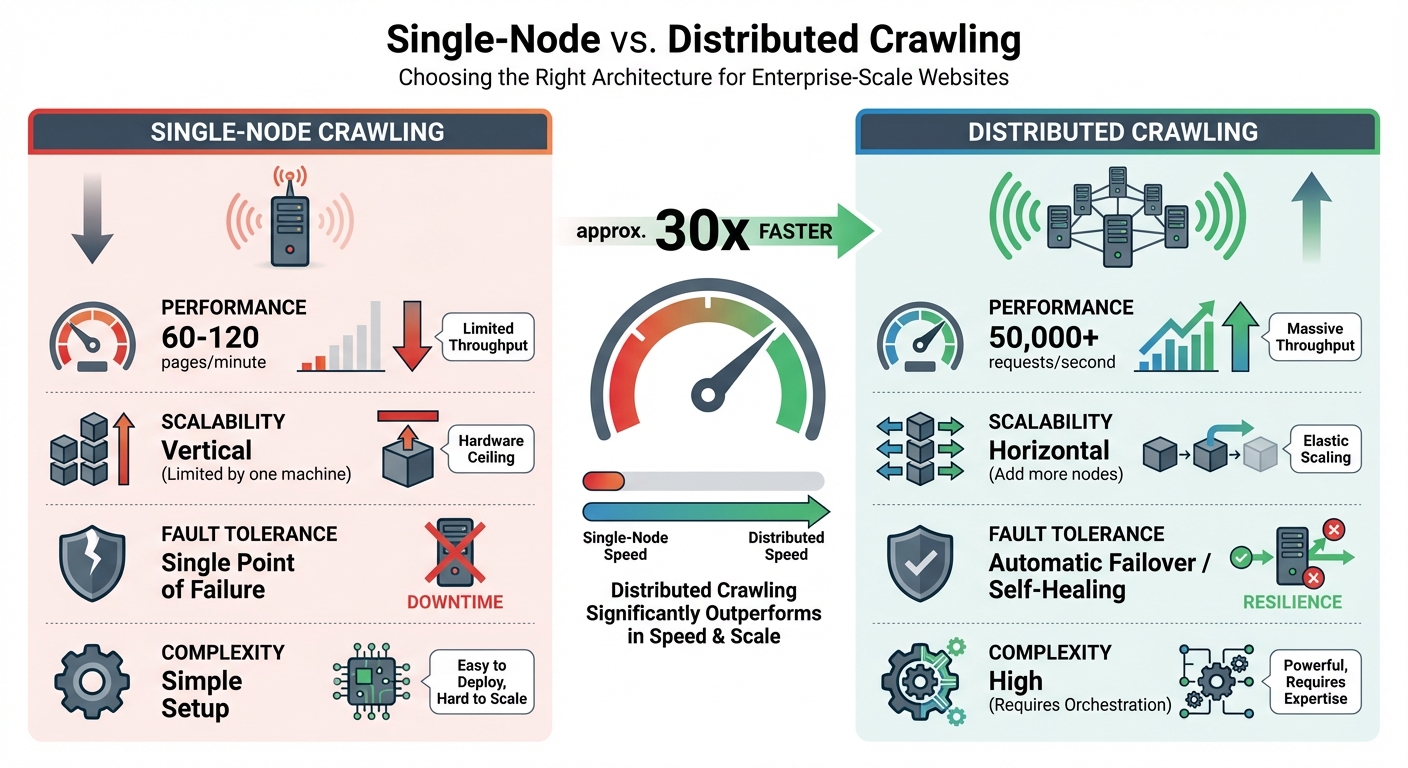
Single-Node vs Distributed Crawling: Performance and Scalability Comparison
Setting Up Robots.txt for Efficient Crawling
Fine-tuning your robots.txt file is a smart way to manage your crawl budget effectively. Enterprise sites often waste as much as 70% of their crawl budget on pages that add little to no value, like duplicates or technical dead-ends. To avoid this, block non-essential directories - think /cart/, /checkout/, /admin/, and /search/ - as these pages don't usually serve search engine purposes but still consume valuable resources. Another common issue is faceted navigation, where filter parameters can generate countless URL variations. To keep this under control, use robots.txt directives or canonical tags to prevent search engines from crawling duplicate URLs unnecessarily.
Don't forget to include your sitemap location in the robots.txt file. This helps crawlers identify and prioritize your most important pages. If your site spans multiple subdomains or has international versions, consider creating separate robots.txt files for each one. This approach gives you more precise control over crawling rules.
Using Rate Limiting and Politeness Policies
Politeness policies are crucial for avoiding server overload. For large sites that explicitly allow crawling, a rate of 1–2 requests per second is generally acceptable. On smaller or medium-sized sites, a slower pace - about one request every 10–15 seconds - works better.
When your crawler encounters 429 (Too Many Requests) or 503 (Service Unavailable) responses, treat them as signals to slow down rather than errors. Implement exponential backoff with jitter, introducing random delays to prevent all your crawler nodes from retrying at the same time. If the server provides a Retry-After header, respect it.
"There's no magic trick to fast crawling. Quality and patience beat brute force." - John Mueller, Search Advocate, Google
Make sure your User-Agent string identifies your crawler clearly and includes contact information, such as an email address or a URL. This transparency helps webmasters trust your crawler and even whitelist it if needed. For distributed crawlers, use centralized tools like Redis to enforce rate limits across all nodes, ensuring consistent throttling even when requests come from multiple machines.
Once you've established polite crawling practices, you can scale up by adopting distributed crawling infrastructure.
Distributed Crawling Infrastructure
Managing millions of pages requires distributed crawling to avoid bottlenecks. A single-node crawler can only process 60–120 pages per minute, while distributed systems can handle 50,000+ requests per second. The difference lies in scalability: single-node crawlers rely on one machine's resources, while distributed systems grow by adding more nodes.
The backbone of this setup is a modular microservices architecture, where fetching, parsing, and storage are handled as separate services. This design eliminates resource bottlenecks and allows each component to scale independently. For example, you can adopt a "fetch once, parse many" strategy by storing raw HTML in Amazon S3 and processing it asynchronously. This approach reduces bandwidth usage and minimizes server strain.
When it comes to managing URLs efficiently, Bloom filters are a game-changer. They use 90% less memory than standard hash sets, enabling you to track a billion URLs in just 1.2 GB instead of 12 GB. For handling large-scale data flow, tools like Kafka provide massive throughput, while RabbitMQ offers flexibility with priority queues. Not every page requires a headless browser - reserve tools like Puppeteer or Playwright for JavaScript-heavy content and stick to lightweight HTTP clients for static pages.
| Feature | Single-Node Crawling | Distributed Crawling |
|---|---|---|
| Performance | 60–120 pages/minute | 50,000+ requests/second |
| Scalability | Vertical (limited by one machine) | Horizontal (add more nodes) |
| Fault Tolerance | Single point of failure | Automatic failover/self-healing |
| Complexity | Simple setup | High (requires orchestration) |
sbb-itb-641714f
Managing Data Quality and Compliance
Data Deduplication and Accuracy
Once scalable crawling is in place, the next step is ensuring top-notch data quality. This involves a three-tiered deduplication process: URL, content, and entity levels.
- URL Deduplication: Normalize URLs by removing UTM parameters and arranging query strings alphabetically. For instance,
example.com/product?id=123&ref=emailandexample.com/product?ref=email&id=123would be treated as the same page. - Content Deduplication: Use SHA-256 hashing to create unique fingerprints for page content, making it easier to spot duplicates. For near-duplicates, like paraphrased descriptions or translated text, tools like SimHash and MinHash come in handy. A Hamming distance of 3–5 on 64-bit fingerprints typically signals a close match.
- Entity Deduplication: Consolidate multiple records into a single entity - for example, merging different listings for the same product SKU. Advanced systems aim for an extraction accuracy rate exceeding 99.5%. Automated schema validation tools, such as JSON Schema or Pydantic, help catch errors like missing fields or incorrect data types.
Modern crawling setups often separate the data acquisition layer from a dedicated quality layer. This quality layer detects changes like schema drift (alterations in DOM structure), semantic drift (shifts in field meanings), and distributional drift (statistical changes in data). A "fetch once, parse many" approach - storing raw HTML (e.g., in Amazon S3) - allows for updates to parsing logic without reloading the source site.
Meeting Accessibility and Legal Standards
Enterprise crawling also involves ensuring compliance with accessibility and legal requirements. For accessibility, specialized user agents like "Chrome A11y" can render JavaScript and trigger the appropriate viewports. Many WCAG-compliant elements only appear after the DOM fully loads. Automated WCAG 2.2 tests, such as color contrast checks, can streamline this process. To reduce strain on infrastructure, consider scheduling these scans during off-peak hours and whitelisting your crawler’s IPs.
Legal compliance is equally critical. Regulations like GDPR and CCPA require a clear lawful basis for processing personal data - public availability isn’t enough. To address this, implement automated detection and redaction of personally identifiable information (PII) during data ingestion. Collect only what’s necessary, such as product prices without user reviews, to reduce both legal risks and storage costs.
The stakes are high: starting August 2, 2026, the EU AI Act will impose strict data governance rules for high-risk AI systems, with penalties reaching up to $35 million or 7% of global annual revenue.
"Compliance is no longer an option when scraping and collecting data. Rather, it should be treated as a strategic foundation upon which other strategies are built."
- Gurpreet Singh Arora, Damco Group
Maintaining a detailed audit trail for every request - covering the source URL, timestamp, proxy IP, and robots.txt status - is crucial for regulatory audits. While robots.txt isn’t legally binding, respecting its directives reflects good faith and supports data minimization principles. By combining deduplication with compliance measures, large-scale crawls can remain efficient and legally sound.
How dCLUNK™ Simplifies Compliance Checks
dCLUNK™ is designed to handle UX, performance, accessibility, and compliance issues. The platform checks for WCAG compliance, evaluates performance metrics like LCP and TBT, and flags compliance signals such as cookie banners, consent flows, and GDPR/ADA requirements. These scans, offered for free, provide actionable recommendations with prioritized fixes. For teams managing large-scale crawls, dCLUNK™ acts as a proactive compliance tool, identifying potential legal risks before they escalate. This eliminates the need for manual audits across thousands of pages, saving both time and resources.
Monitoring and Optimizing Crawling Performance
Real-Time Monitoring Tools and Alerts
Real-time monitoring tools like Prometheus and Grafana are essential for ensuring smooth crawling operations and meeting SLAs. Back in March 2026, Cloud DevOps Engineer Berkan Osmanli developed a monitoring stack that combined Uptime Kuma for backend API tracking, Prometheus for collecting metrics every 15 seconds, and Grafana (Dashboard ID 18667) for real-time visualization. This setup allowed for transparent monitoring of 99.5% annual SLAs, tracking metrics like response times and certificate expirations.
Key metrics to monitor include:
- Throughput: Pages fetched per second.
- Reliability: Success rates, failure rates, and error codes like 429 (throttling) or 503 (service unavailable).
- Performance: Average response times and resource consumption.
- Data Quality: Parsing success and failure rates.
Structured logging with the ELK Stack helps track URL patterns, timestamps, and error types for quick troubleshooting. Automated alerts through platforms like Slack, email, or PagerDuty ensure teams can respond swiftly to issues like status code spikes or blocked IPs.
"You can't scale what you can't observe. When you have multiple crawling services running across regions and domains, visibility into operations is essential." - SSA Group
With live metrics in place, the next step is refining crawl strategies to make the most of your resources.
Optimizing Crawl Strategies for Large Websites
The data from real-time monitoring can guide smarter crawl strategies, ensuring resources are directed toward high-value pages. This approach tackles challenges related to crawl volume and data quality, even during heavy loads.
Prioritize high-value "Tier 1" pages - those that drive conversions or authority - while excluding low-value URL patterns (e.g., internal searches, filters, admin pages) using robots.txt. For example, a mid-size e-commerce site with 85,000 product pages reduced crawl waste by 73% over 90 days. By blocking filter patterns in robots.txt, cleaning up sitemaps to remove out-of-stock items, and using a CDN to cut response times from 1,200 ms to 340 ms, they improved new product indexing speed from 21 days to just 4 days. This overhaul boosted organic traffic by 58% and added an estimated $125,000 in monthly revenue.
Here are some additional best practices:
- Use HTML crawls for static content and save JavaScript rendering for dynamic content.
- Maintain a Time to First Byte (TTFB) under 200 ms for optimal performance.
- Keep the "200 OK" response rate above 95% to ensure healthy crawling.
- Limit crawl depth to four levels to balance coverage and resource use.
- Schedule high-volume crawls during off-peak hours to reduce strain on site performance.
Analyzing Crawl Data for Actionable Insights
Monitoring for "drift" - like changes in latency, retry depth, or completion time - can provide deeper insights than just checking if a crawler is up or down. For instance, setting Prometheus alerts to trigger when latency rises 40% above the average of the last seven runs can help catch gradual performance declines before they become major issues.
"A crawler that slowly gets worse is far more dangerous than one that crashes. Crashes get attention. Drift gets normalized." - Karan Sharma, PromptCloud
Analyzing the ratio of total pages to the average pages crawled daily can reveal "index bloating." If the crawl budget efficiency exceeds 10, it indicates a site has 10 times more pages than Google crawls daily, signaling a need for optimization. Internal linking metrics like DeepRank can also highlight poorly linked sections that hinder search engine discovery and user navigation.
Tools like dCLUNK™ go a step further by flagging compliance issues and linking performance drifts to user experience impacts. Its free scans prioritize recommendations, helping teams address high-impact issues without manual audits. By continuously analyzing crawl data, businesses can stay ahead of challenges and keep their websites running efficiently.
Conclusion: Key Takeaways for Enterprise Crawling
Final Recommendations
When it comes to enterprise crawling, having a modular and distributed architecture is key. This setup allows for horizontal scaling and eliminates single points of failure, ensuring the system can handle large-scale operations effectively. One of the most important strategies is adopting a "fetch once, parse many" approach. This avoids making redundant requests to servers, saving both time and resources.
Rate limiting plays a crucial role in maintaining ethical and efficient crawling. Stick to domain-specific limits, respect robots.txt directives, and use exponential backoff when encountering 429 or 503 status codes. Managed services have proven to reduce failure rates by over 40% and increase dataset delivery speeds by 1.6x, showing their value in large-scale operations. Before diving into massive crawls, start with small sample runs across various page types to identify patterns and potential issues.
Real-time monitoring tools like Prometheus and Grafana are essential for keeping tabs on success rates, latency, and error distribution. These tools help catch problems early before they escalate. For maintaining data quality, techniques like content hashing (using SHA-256) or Bloom filters are highly effective for deduplication. Bloom filters, for instance, are incredibly memory-efficient, needing just 1.2GB to handle one billion URLs compared to over 12GB with standard Redis Sets. Tools like dCLUNK™ simplify compliance checks and link performance issues directly to user experience impacts, enabling teams to address high-priority fixes without tedious manual audits. By integrating compliance, performance, and data quality efforts, enterprise-scale crawling becomes more effective and sustainable.
Next Steps for Implementation
To put these strategies into action, begin by whitelisting your crawler with your internal network team. This step is often overlooked but is one of the most common reasons for crawl failures in large organizations. Schedule high-volume crawls during off-peak hours to minimize the impact on the target site. Additionally, clean up your URL parameters to avoid duplicate patterns that can unnecessarily inflate crawl sizes.
Transitioning from monolithic scripts to microservices orchestrated by Kubernetes can dramatically improve performance. This approach enables distributed crawling at speeds up to 30 times faster than single-node systems, supporting over 50,000 requests per second. To optimize resource usage, assign lightweight HTTP workers for static HTML content and reserve headless browsers like Playwright or Puppeteer for JavaScript-heavy pages. Use dCLUNK™ to quickly pinpoint immediate issues, then apply those insights to fine-tune your crawling priorities and allocate resources more effectively. This combination of strategies ensures your enterprise crawling efforts are both efficient and scalable.
FAQs
How do I set crawl limits without hurting site performance?
To manage crawl limits effectively without slowing down your site, implement smart rate limiting and follow robots.txt directives. Pay attention to your crawl budget by fine-tuning URL parameters and steering clear of pages with little value. Set your crawler to control request rates, focus on high-priority pages, and keep an eye on activity in real-time. This way, you can make adjustments as needed and avoid putting unnecessary strain on your server.
When should I use a headless browser instead of HTML crawling?
For websites that rely on JavaScript or frameworks like React, Angular, or Vue to load their content, a headless browser is the way to go. These tools can simulate user behavior, making them great for navigating dynamic sites or handling pages with advanced anti-bot measures.
On the other hand, HTML crawling is a better choice for static websites where all the content is directly embedded in the HTML. It’s simpler and faster because there’s no need to render JavaScript or mimic user actions.
In short, headless browsers shine for complex, interactive sites, while HTML crawling is perfect for straightforward, static pages.
What’s the safest way to handle GDPR/CCPA while crawling at scale?
When scaling web crawling operations, staying compliant with regulations like GDPR and CCPA is non-negotiable. A privacy-first infrastructure is key. This means focusing on lawful data collection, transparency, and security from the ground up.
Here are some best practices to follow:
- Use consent-based proxies to ensure data collection aligns with legal requirements.
- Respect robots.txt files to honor website owners' preferences.
- Implement smart rate limiting to avoid overwhelming servers and maintain ethical crawling behavior.
- Leverage real-time monitoring to detect and address compliance issues as they arise.
Additionally, modular architectures - where fetching, parsing, and storage processes are separated - can improve both compliance and system resilience. This structured approach helps enterprises adhere to legal standards while maintaining effective large-scale crawling operations.
Explore the six basics
Every Clunky AI article maps back to one or more of the questions a business site has to answer.
Related Posts
Tags AccessibilityPerformancePrivacy
Category Website Optimization