Website UX Audit: 12 Essential Checkpoints
1/5/2026 • 12 min read

Website UX Audit: 12 Essential Checkpoints
Your website could be pushing users away without you realizing it. 88% of users won’t return after a bad experience, and 40% will leave if your site takes over 3 seconds to load. A UX audit helps identify these issues and provides a clear roadmap to fix them.
Here’s what you’ll learn:
- How to improve navigation and simplify user journeys.
- Why page speed and mobile responsiveness matter for conversions.
- How content and design impact trust and usability.
- The role of accessibility and compliance in creating a better experience.
- Tips for optimizing interactive elements like buttons and forms.
Even small fixes can lead to big results - like Walmart’s 2% conversion boost for every second saved on load time. Whether it’s streamlining navigation, enhancing page speed, or improving accessibility, this guide will help you tackle the 20% of problems causing 80% of your website’s challenges.
Keep reading for practical steps to make your website user-friendly and conversion-ready.
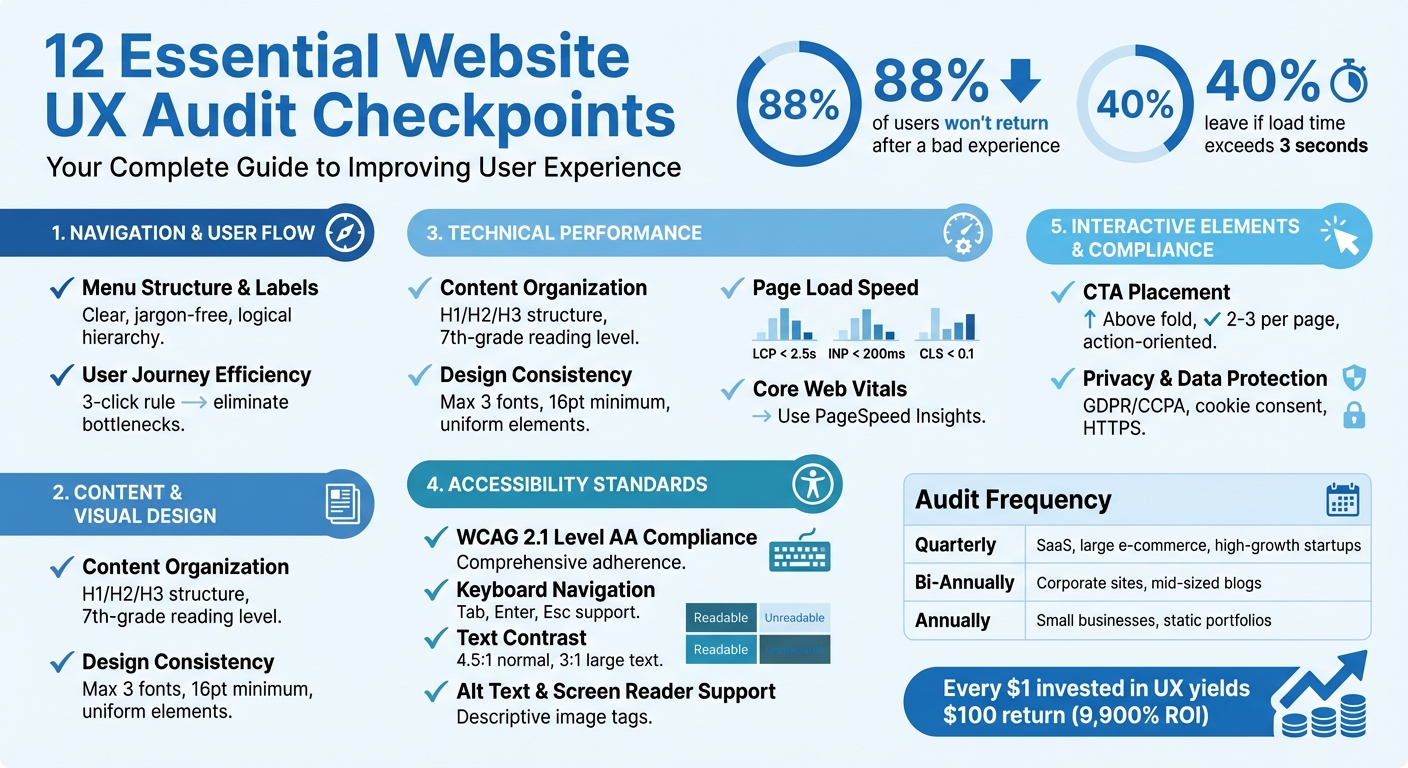
12 Essential Website UX Audit Checkpoints
UI UX Audit Process - How to Stop Skipping Them [Free UX Audit Checklist]
sbb-itb-641714f
Navigation and User Flow
Navigation serves as the roadmap guiding users to their goals. If it’s confusing or involves too many steps, users are likely to leave. In fact, 94% of a user's first impression of a website ties directly to its design. A cluttered menu or poorly labeled options can make even the most useful content hard to find. Here’s how to fine-tune your navigation for a smoother user experience.
Menu Structure and Labels
Start by checking if your menu labels make sense to someone visiting for the first time. Labels should be straightforward, free of jargon, and clearly distinct from one another. For example, avoid overlapping terms like "Services" and "Solutions" for similar content categories. This reduces the need for users to guess or click multiple options to find what they need.
"Navigation options in the menu and on the page are clear, visible, and scannable." – Washington State University
Organize your menu with a logical hierarchy, grouping related items together. Place the navigation bar at the top of the page, where users naturally expect it to be. Double-check that every link leads to the correct destination - predictability is non-negotiable. With over 60% of web traffic coming from mobile devices, it’s vital to ensure mobile navigation, like hamburger menus or bottom navigation bars, is thumb-friendly and easy to access.
User Journey Efficiency
Map out the paths users take to complete key actions, such as signing up, purchasing, or finding contact details. The 3-click rule is a helpful guideline: users should be able to complete any task or access any page within three clicks. While this rule isn’t absolute, every extra step increases the risk of users abandoning their journey.
"Chances are, you've heard of the '3-click' rule, which stipulates that it shouldn't take users more than three clicks to do whatever it is they want to do." – Kenny Lee, HubSpot
Look for bottlenecks like rage clicks, where users repeatedly click on an unresponsive element, or areas with high bounce rates. Tools like heatmaps and session recordings can help you spot where users struggle. Make sure internal links connect related pages in a logical flow, so visitors don’t have to keep returning to the main menu. Lastly, test critical processes like checkout or onboarding on both desktop and mobile to catch any interactive issues.
Content and Visual Design
Once you've streamlined navigation, the next logical step is to focus on content and visual design. These elements are crucial because they directly influence how users perceive your brand. In fact, 75% of users judge a website's credibility based on its design. Poor readability or mismatched visuals can quickly turn users away. Just like intuitive menus simplify navigation, well-presented content builds trust and keeps users engaged.
Content Organization and Readability
When organizing your content, aim for clarity and simplicity. Break text into short paragraphs and use a clear H1 heading for every page, supported by structured H2 and H3 subheadings. Incorporate bullet points and leave plenty of white space to avoid overwhelming visitors. Content should be easy to read and accessible to someone with a 7th-grade reading level. This approach not only enhances usability but also ensures your information is easy to scan and understand.
"Good usability is invisible. Poor usability is annoying and impossible to ignore." – Drew Lyon, GLIDE
Make sure internal links are descriptive and meaningful - avoid generic phrases like "click here". This helps users and search engines alike understand where the links lead. Also, ensure your value proposition is immediately visible "above the fold". Visitors should understand what you offer within three seconds of landing on your homepage.
Design Consistency
Consistency in design is key to creating a polished, professional look. Stick to a maximum of three font families, and make sure body text is no smaller than 16pt. Place your logo in the top-left corner, link it to the homepage, and maintain uniformity in navigation menus, buttons, and footers across all pages.
"Consistent visual and textual communication makes a brand recognizable, reliable and trustworthy. It's one of the foundations of successful branding." – Romina Kavcic, Founder, The Design System Guide
Regularly audit your site for inconsistencies, such as mismatched button designs, varying hover effects, or outdated copyright dates - these small issues can undermine user confidence. Additionally, use tools like WAVE or Axe to check that your site meets WCAG standards for color contrast and font size across all pages. By maintaining these standards, you reinforce trust and ensure a seamless experience as users navigate your website.
Technical Performance and Accessibility
Evaluating your site's technical performance and accessibility is crucial. These elements form the backbone of a smooth user experience, which directly affects engagement and conversions. When your site performs well, it works for everyone - whether it's users with disabilities or those dealing with slower internet connections. The stakes are high: 53% of mobile users will leave a site if it takes more than 3 seconds to load, and Amazon discovered that just a 100-millisecond delay cost them 1% in sales.
Page Load Speed
Page load speed is a critical factor in technical performance. Google uses three Core Web Vitals to assess this:
- Largest Contentful Paint (LCP): Measures how quickly the main content loads. Aim for under 2.5 seconds.
- Interaction to Next Paint (INP): Tracks how fast your site responds to user interactions. Keep it under 200 milliseconds.
- Cumulative Layout Shift (CLS): Ensures elements on your page don't shift unexpectedly while loading. Target a score below 0.1.
To measure and improve these metrics, tools like Google PageSpeed Insights or Lighthouse are invaluable. Speed optimization strategies include compressing images, minifying CSS/JavaScript, enabling browser caching, and using a Content Delivery Network (CDN) to serve content closer to users. Additionally, always define width and height attributes for images and ad slots to prevent layout shifts during loading.
For example, in 2024, the agricultural marketplace Agrofy conducted a page speed audit and resolved performance issues. The result? A 76% reduction in cart abandonment. This demonstrates how improving load speed can lead to tangible business outcomes.
Accessibility Standards
Accessibility goes beyond compliance - it's about making your website usable for everyone. Start by aligning with WCAG 2.1 Level AA standards, which most public websites are required to meet. Automated tools like WAVE can help identify basic issues, but manual testing is essential for a thorough review.
Key accessibility checks include:
- Testing keyboard navigation with Tab, Enter, and Esc to ensure all elements are reachable and focus is visible.
- Adding descriptive alt text for all images, leaving decorative images with empty alt attributes.
- Structuring your heading hierarchy logically, with only one H1 per page.
- Ensuring text contrast meets the minimum ratios: 4.5:1 for normal text and 3:1 for large text.
- Verifying that content remains readable when zoomed to 200% and that all form inputs have associated
<label>elements.
In one notable case, BetterVet, a mobile veterinary service, performed a technical audit that addressed significant site errors affecting crawling and indexing. This effort led to an astounding 2,002% increase in organic traffic. It's a clear example of how resolving technical barriers can dramatically expand your site's reach and effectiveness.
Interactive Elements and Engagement
Interactive elements play a key role in connecting user actions to your website, taking the user experience beyond just technical and accessibility optimizations. When buttons fail to respond, forms don't work as intended, or links lead to dead ends, you risk losing both engagement and conversions. The numbers paint a clear picture: 88% of consumers avoid websites after a single bad experience, and the cart abandonment rate in 2025 reached 71.72%. Every broken interaction comes at a cost.
Call-to-Action Placement and Design
Call-to-Action (CTA) buttons are essential for guiding users toward conversions. To maximize their effectiveness, they should be prominently placed - ideally above the fold - and surrounded by ample whitespace to make them stand out. The messaging matters too: opt for clear, action-oriented phrases like "Start Your Free Trial" instead of vague terms like "Submit."
Each page should feature 2–3 high-contrast CTA buttons. Use tools like heatmaps to confirm their visibility and ensure that mobile tap targets are large enough to avoid accidental clicks. Beyond placement, the design must also include responsive feedback to maintain user engagement.
Interactive Element Feedback
Immediate feedback from interactive elements is critical. Without it, users may get frustrated and repeatedly click on unresponsive items. Elements like buttons should offer visual cues, such as color changes on hover, and forms should display inline errors to guide users. For actions requiring processing, spinners or progress indicators reassure users that their input is being handled.
A great example of this in action comes from the agency Gravytrain, which worked with Bulldog Skincare to enhance their checkout process. By adding a progress bar and recommended product carousels, they provided users with clear feedback about their purchase journey. The results? A 208% increase in total sales and a 78% boost in conversion rates.
"Any optimization work should start with a clear understanding of your target customers' objectives and attitudes. This is where a UX audit can be particularly helpful. By combining interviews and journey analysis, you can create a hypothesis around why paths or processes don't align with the shopper's ambitions." – Raadhika Patel, On-site Experience Manager at Gravytrain
Testing is non-negotiable. Every button, link, and form field must be validated across devices. Conduct test purchases to ensure the checkout process runs smoothly. Additionally, interactive elements should be accessible via keyboard navigation and include ARIA labels for screen readers. Considering that every $1 invested in UX yields a $100 return - a 9,900% ROI - perfecting these details isn't just good design; it's a smart investment. These efforts reinforce the usability principles discussed earlier, ensuring a seamless experience for all users.
Compliance and Data Protection
If your website caters to users in the UK, EU, or California, you need to clearly outline their privacy rights under GDPR and CCPA. These regulations are no joke - within the first 20 months of GDPR enforcement, regulators handed out fines exceeding €114 million. One notable case? In January 2020, Eni Gas e Luce faced an €11.5 million penalty for unlawful data processing and unsolicited marketing practices.
Privacy and Data Compliance
When conducting a thorough UX audit, make sure data protection is a core part of the user experience. Start by ensuring your site includes an easy-to-find Privacy Policy. This should feature a "What Are Your Privacy Rights" section that explains how data is collected, outlines user rights, and provides a simple way (like an email address or web form) for users to exercise those rights.
Don’t forget about cookies! Implement a clear cookie banner that requires users to give affirmative consent for any non-essential cookies. Allow them to customize their preferences for categories like analytics, advertising, and functionality. For California-based visitors, include a footer link labeled "Do Not Sell or Share My Personal Information" or "Your Privacy Choices" to comply with CCPA. Ignoring these steps can be costly - just ask mobile game developer Jam City, which was fined $1.4 million in December 2025 for CCPA violations.
To further reassure users, secure all data transmissions with HTTPS. A missing or invalid SSL certificate isn’t just a technical oversight; it’s a trust killer. Tools like Google Search Console and CLUNKY.ai's dCLUNK™ scanner can help you identify vulnerabilities, ensure your cookie banners meet regulatory standards, and verify compliance with GDPR and ADA/WCAG guidelines.
Conclusion
Conducting a strategic UX audit is a smart move for maintaining a high-performing website. By regularly addressing usability issues, you can eliminate friction, improve accessibility, and build trust - key factors that keep users engaged and coming back. The 12 checkpoints we’ve covered work together to tackle problems like navigation challenges, slow load times, broken links, and compliance gaps, all of which directly impact your bottom line.
"Yearly is something doable and on time before too many UX problems occur" – Gediminas Skirmuntas, Senior UX Designer at Omnisend.
For businesses with heavy traffic or rapid growth, increasing the frequency of audits to quarterly or bi-annual reviews can be even more beneficial. Catching potential issues early can save resources and prevent costly problems down the line. Tailor the audit frequency to your website's size and growth stage to keep usability and performance optimized.
| Audit Frequency | Recommended For | Primary Benefit |
|---|---|---|
| Quarterly | SaaS, large e-commerce sites, high-growth startups | Quickly identifies issues in new features or evolving user flows. |
| Bi-Annually | Corporate websites, mid-sized blogs | Strikes a balance between resource use and catching emerging problems. |
| Annually | Small businesses, static portfolios | Ensures technical health and brand consistency as a baseline. |
This structured schedule ensures that issues are resolved promptly, keeping the user experience smooth and seamless. Prioritize problems based on their impact: critical blockers (issues that prevent essential actions), high-impact friction points (elements that lower engagement), and minor refinements (cosmetic tweaks). Focus on what matters most - like fixing mobile conversion gaps or clarifying calls-to-action - rather than trying to tackle every minor issue at once.
Revisiting these 12 checkpoints regularly will strengthen your site’s performance and boost user satisfaction. Use real-time analytics to confirm that your fixes are effective and to stay ahead of changing user expectations. A proactive approach like this ensures your site remains competitive and user-friendly.
FAQs
What are the main benefits of a website UX audit?
A website UX audit is your chance to uncover and resolve issues that could be frustrating your visitors. Think about things like confusing navigation, sluggish load times, or content that’s hard to access. Tackling these problems can have a big impact - lower bounce rates, happier users, and more conversions, all of which can directly boost your revenue.
Beyond fixing problems, a UX audit gives you actionable insights to fine-tune key performance metrics like session duration, exit rates, and conversion rates. With this data-driven approach, you can focus your efforts on updates that offer the biggest payoff, turning your website into a stronger tool for engagement and sales.
Keeping up with regular audits also helps your site stay in sync with changing user expectations and industry trends. By addressing potential challenges before they escalate, you ensure a seamless, enjoyable experience that keeps visitors coming back and supports your business’s growth over time.
Why does improving page load speed matter for user engagement and conversions?
Improving how quickly your website loads isn't just a technical tweak - it directly impacts the experience visitors have on your site. Faster-loading pages make browsing smoother and more enjoyable, which can help lower bounce rates. When people stick around longer, they’re more likely to explore your content or take actions that matter, like making a purchase or signing up for a newsletter.
Speed also plays a big role in building trust. A site that loads quickly feels reliable and professional, encouraging users to stay engaged. In the end, better page speed can mean higher interaction rates, more conversions, and even a boost in revenue for your business.
Why is website accessibility important for your business?
Making your website accessible isn’t just the right thing to do - it’s essential for creating a site that everyone can use, including people with disabilities. This means ensuring your site works for individuals with visual, auditory, motor, or cognitive impairments. Plus, it’s not just about inclusion; it’s also a legal requirement under the Americans with Disabilities Act (ADA). Ignoring accessibility can lead to lawsuits and harm your brand’s reputation.
But there’s more to accessibility than just meeting legal standards. It enhances the overall user experience for everyone. Features like high-contrast text, clear headings, and easy keyboard navigation make it simpler for all visitors to find what they need. This can lower bounce rates, improve engagement, and even drive more conversions. On top of that, accessible websites tend to rank better on search engines, which means more organic traffic and potential revenue. By prioritizing accessibility, you’re not only doing what’s right - you’re also setting your business up for success and earning the trust of your audience.
Explore the six basics
Every Clunky AI article maps back to one or more of the questions a business site has to answer.
Related Posts
Tags AccessibilityPerformanceUser Experience
Category Website Optimization