Why Your Website Fails Compliance Standards
2/2/2026 • 16 min read
Why Your Website Fails Compliance Standards
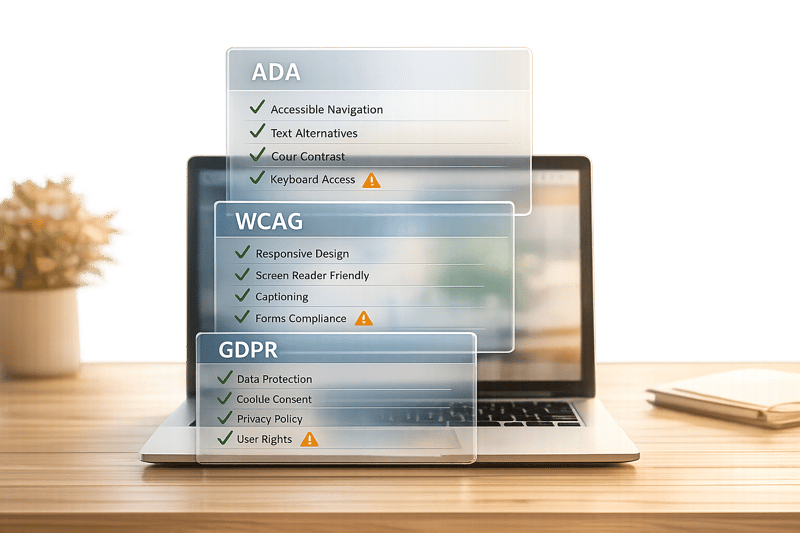
Your website could be at risk of lawsuits, lost users, and damaged trust if it fails to meet accessibility, privacy, and ADA compliance standards. Here's why this matters:
- ADA Compliance: Websites must be accessible to individuals with disabilities, as mandated by the Americans with Disabilities Act. Non-compliance can lead to lawsuits, like the Domino’s Pizza case, where a blind customer couldn't use the site.
- Accessibility Issues: Common problems include missing alt text, poor color contrast, and broken keyboard navigation, making websites unusable for many users.
- Privacy Violations (GDPR): Non-compliant cookie banners, vague privacy policies, and difficult consent withdrawal processes can result in hefty fines and eroded user trust.
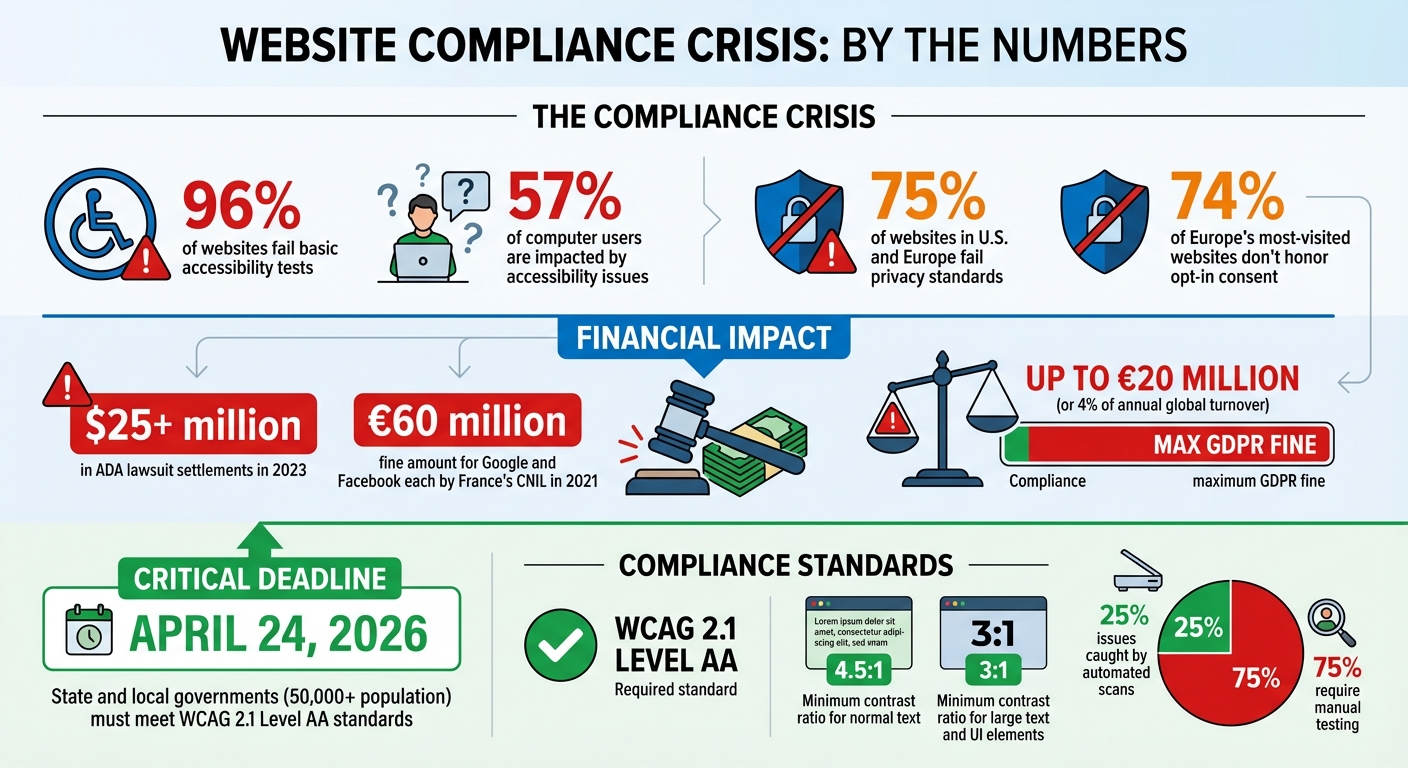
- Upcoming Deadlines: By April 24, 2026, state and local governments with populations over 50,000 must meet WCAG 2.1 Level AA standards. Private businesses are already expected to follow ADA Title III.
What You Can Do:
- Fix accessibility issues like alt text, form labels, and color contrast.
- Ensure GDPR compliance with clear cookie consent and privacy policies.
- Regularly test your site with automated tools and manual audits.
Tools like CLUNKY.ai can scan your site for problems and provide actionable fixes, helping you stay ahead of legal risks while improving your website for all users.
Website Compliance Failures: Key Statistics and Deadlines
ADA Website Compliance Guide: Accessibility and the Law
Common WCAG Accessibility Failures
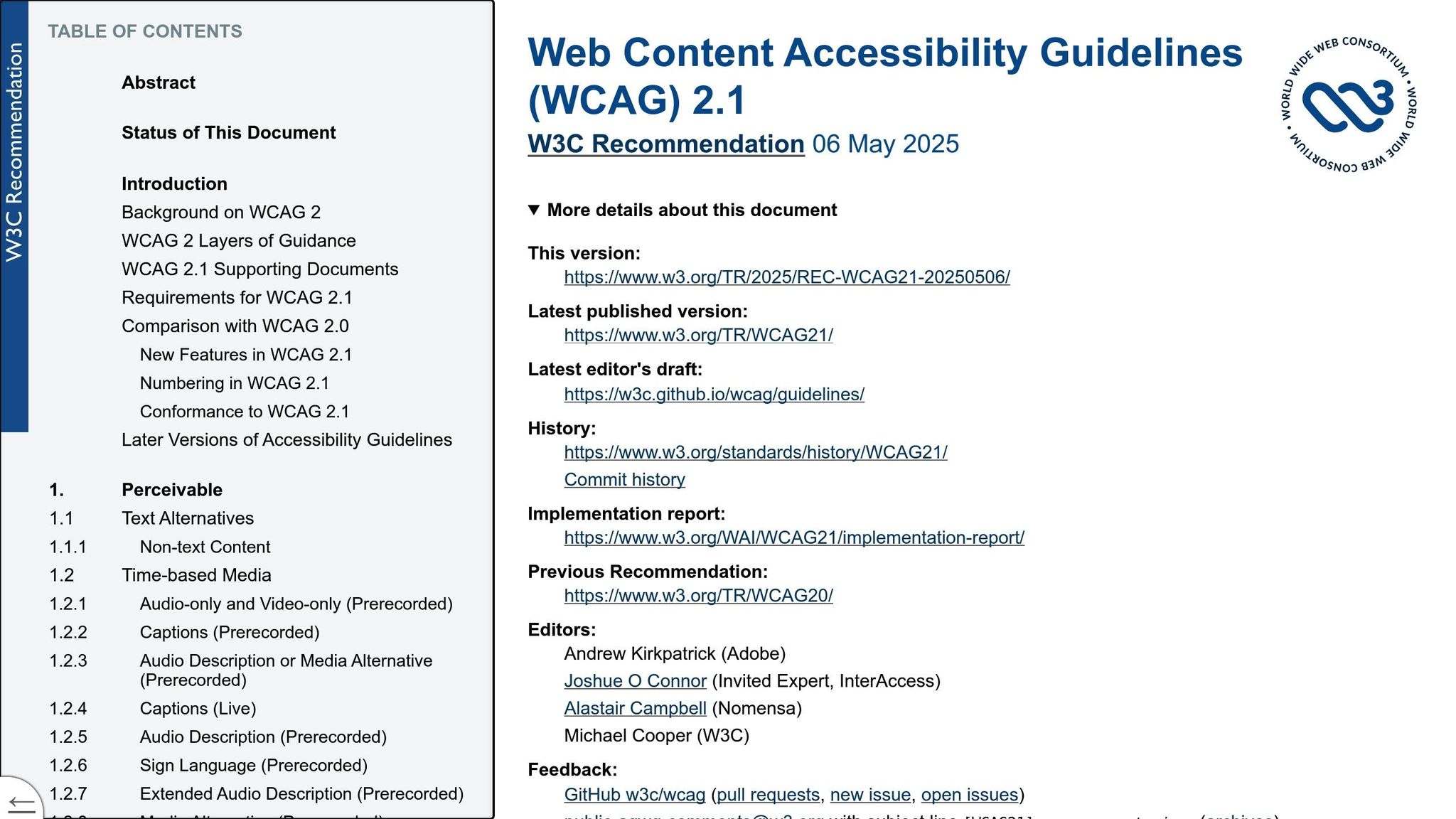
Many websites face similar challenges when it comes to accessibility, creating barriers that prevent users with disabilities from fully experiencing online content.
Missing or Incorrect Alt Text
Alt text plays a crucial role in making images accessible to users who rely on screen readers. Without it - or if it's poorly written - users with visual impairments may be left confused or miss important details. For instance, instead of hearing a meaningful description, screen readers might announce something unhelpful like "image123.jpg."
But the problem isn’t just about missing alt text; it’s also about how it’s written. Some alt text is too vague, overly detailed, or simply repeats visible text. Others misuse the title attribute instead of alt or fail to mark decorative images properly, forcing screen readers to announce unnecessary graphics.
"Alternative text, also known as alt text, is descriptive text that conveys the meaning of an image in digital content. It's designed to make visual content accessible to people with vision disabilities."
– Section508.gov
To write effective alt text, focus on the image’s purpose rather than its appearance. For example, for a search button, use alt text like “Search” instead of describing the icon. Decorative images should be marked with an empty alt attribute (alt="") so they’re ignored by screen readers. If an image contains text, include an exact transcription in the alt text.
This attention to detail ensures that users with visual impairments can navigate and understand content more effectively. Another common issue, color contrast, also greatly impacts accessibility.
Poor Color Contrast
Color contrast measures the difference in brightness between text and its background. When contrast is too low, it can make text difficult to read, especially for users with low vision or color blindness. WCAG guidelines recommend a contrast ratio of at least 4.5:1 for normal text and 3:1 for larger text. User interface elements, like form borders and icons, should also meet a 3:1 ratio.
A frequent misstep is using light gray text on white backgrounds or designing buttons that blend into the page. Even hover states, focus indicators, and active buttons must maintain sufficient contrast. Relying solely on color to convey meaning - such as using red text to signal an error - can create additional barriers for some users.
Tools like the WebAIM Contrast Checker make it easy to test color combinations by entering hex codes and checking compliance. Browser extensions like Accessible Web Helper can highlight contrast issues directly on your page, making adjustments more straightforward.
While color contrast is essential, accessibility also hinges on ensuring seamless keyboard navigation.
Broken Keyboard Navigation
Keyboard navigation is a cornerstone of the WCAG "Operable" principle. Many users - whether due to visual impairments, limited motor skills, or reliance on assistive devices - depend entirely on keyboards to interact with websites. When keyboard navigation fails, users might find themselves stuck in a modal or form field with no way to move forward or exit.
"All page functionality is available using the keyboard, unless the functionality cannot be accomplished in any known way using a keyboard."
– WebAIM
Common issues include the lack of a visible focus indicator, making it unclear which element is currently active. Other problems include illogical tab orders, missing skip links to bypass repetitive content, and modals that fail to manage focus correctly. Additionally, using positive tabindex values can disrupt the natural navigation flow, causing confusion.
To ensure smooth keyboard functionality, test your site using keys like Tab, Shift+Tab, Enter, Space, and Escape. Every interactive element should be accessible via keyboard commands, and focus indicators should be clearly visible to all users.
GDPR Data Privacy Failures
Failing to address data privacy properly can harm both your users and your business. GDPR sets strict rules on how personal data should be handled, and even well-known companies can face hefty fines for non-compliance. The numbers paint a concerning picture: an estimated 75% of websites in the U.S. and Europe fail to meet current privacy standards. Beyond financial penalties, non-compliance can damage user trust, adding an ethical layer to the discussion.
Let’s dive into some common GDPR missteps, particularly in cookie practices, privacy policies, and consent withdrawal.
Non-Compliant Cookie Consent
Cookie banners are everywhere, but many fail to meet GDPR standards. A 2024 study revealed that 74% of Europe's most-visited websites don't honor opt-in consent as required by GDPR. Some of the most frequent issues include:
- "Accept All" buttons without a similarly visible "Reject" option.
- Pre-checked boxes for non-essential cookies.
- "Cookie walls" that block access unless users agree to all tracking.
These practices violate GDPR guidelines, which require users to provide active consent. A striking example occurred in 2021, when France's CNIL fined Google and Facebook €60 million ($66 million) each. Their infraction? Making it significantly harder to refuse cookies than to accept them. Users could agree with a single click, but rejecting cookies meant navigating through multiple layers of menus - a clear violation of GDPR's requirement for simple consent withdrawal.
"With modern privacy laws now in place, websites have added cookie banners in an attempt to comply, but the banners are usually misconfigured."
– Vaibhav Antil, CEO, Privado
To meet GDPR standards, your cookie banner must include granular controls - offering separate toggles for categories like analytics, marketing, and functional cookies. The "Reject" button should be just as prominent as the "Accept" button. Importantly, non-essential cookies cannot be activated before the user explicitly consents.
Incomplete Privacy Policies
A vague, confusing privacy policy is another common pitfall. GDPR mandates that privacy policies be "concise, transparent, intelligible, and easily accessible". In practical terms, this means avoiding legal jargon and clearly identifying all third-party data processors.
A compliant privacy policy should outline:
- What data is collected and why.
- How long the data is retained.
- Any international data transfers.
- Users' rights, such as accessing, rectifying, erasing, or exporting their data.
Simply copying a generic template without tailoring it to your actual practices can leave you exposed to enforcement actions. Transparency is key - not just to avoid fines but also to build trust with your audience.
Difficult Consent Withdrawal
GDPR Article 7 is unambiguous: withdrawing consent must be as easy as giving it. Yet, many websites make this unnecessarily complicated. Some hide withdrawal options deep in settings, while others require users to contact customer service via email. These barriers violate GDPR's emphasis on user control.
"You need to tell people about their right to withdraw, and offer them easy ways to withdraw consent at any time."
– Information Commissioner's Office (ICO)
To align with best practices, consider adding a persistent "Cookie Settings" icon or a footer link on every page, allowing users to adjust their preferences instantly. For email marketing, include a one-click unsubscribe link in every message. Once a user withdraws consent, you must immediately stop processing their data and maintain an audit trail documenting the withdrawal.
Failing to provide these mechanisms can result in fines of up to €20 million or 4% of your annual global turnover. But the bigger cost might be the erosion of user trust, which is invaluable for retaining and growing your audience.
ADA Inclusivity Failures
The Americans with Disabilities Act (ADA) doesn’t just apply to physical spaces - it extends to websites as well. Yet, every year, thousands of digital accessibility lawsuits are filed in the U.S., often due to preventable design flaws that exclude people with disabilities from accessing basic website features. Like WCAG and GDPR, ADA compliance requires careful attention to detail to ensure user rights are respected. The law is straightforward: individuals with disabilities must have meaningful access to programs and benefits.
"No individual shall be discriminated against on the basis of disability in the full and equal enjoyment of the goods, services, facilities, privileges, advantages, or accommodations of any place of public accommodation."
– ADA Title III, Section 12182(a)
A key ruling has confirmed that digital spaces must meet the same accessibility standards as physical ones. Below are three common ADA compliance failures that websites often encounter.
Unclear Form Error Messages
Forms are a basic part of most websites, but they can become a source of frustration for users with disabilities if error messages aren’t accessible. For instance, if a form flags an error using only visual cues - like a red border around a field - this creates a barrier for screen reader users and people with color blindness. Without proper guidance, users may not know what went wrong or how to fix it.
To comply with ADA standards, error messages need to be programmatically tied to their respective fields. This can be done using the aria-describedby attribute, which allows screen readers to announce both the field label and the error message. Placing error messages near the relevant fields also helps users who rely on screen magnification. Without these adjustments, many users may abandon the form entirely.
Non-Compliant Third-Party Tools
Third-party tools, widgets, and plugins are often overlooked when it comes to accessibility, but they’re not exempt from ADA requirements. Under Title II, state and local governments must ensure third-party content meets WCAG 2.1 AA standards, and private entities face similar expectations under Title III.
One common pitfall is the use of automated "overlay" widgets, which claim to provide instant ADA compliance. These tools often promise quick fixes but fail to address deeper coding issues, sometimes even creating a separate, less accessible experience for users with disabilities. This has made websites using such tools frequent targets for lawsuits.
"These automated 'solutions' are ineffective and websites with widgets installed are specifically targeted by some plaintiffs' law firms."
– Kris Rivenburgh, Founder, Accessible.org
Before integrating any third-party tool, it’s essential to request a Voluntary Product Accessibility Template (VPAT) or an accessibility statement from the developer. Also, test the tool manually using only a keyboard. If you can’t navigate all features using the Tab, Enter, and Arrow keys, the tool likely isn’t compliant. While automated scans are helpful, they only catch about 25% of WCAG 2.1 AA criteria, making manual testing a must.
Inaccessible Dynamic Content
Dynamic content, like live updates, chat messages, or real-time search results, can present significant challenges for accessibility. When this content changes without a page reload, screen readers may miss the updates unless specific ARIA attributes are used.
To ensure accessibility, ARIA live regions (e.g., role="alert" or aria-live) can be implemented, allowing screen readers to announce updates as they occur. Additionally, users should have the option to pause content that moves or blinks for extended periods, as these can be disorienting for individuals with cognitive disabilities or those using assistive technologies.
A notable example is the 2022 settlement between the Department of Justice and Kroger over its COVID-19 vaccine registration portal. The portal was found to be inaccessible to screen reader users with visual impairments. As part of the settlement, Kroger was required to align with WCAG 2.1 AA standards and conduct regular accessibility testing. This case highlights how even helpful features can become barriers when dynamic content isn’t properly handled.
sbb-itb-641714f
How CLUNKY.ai Identifies Compliance Problems
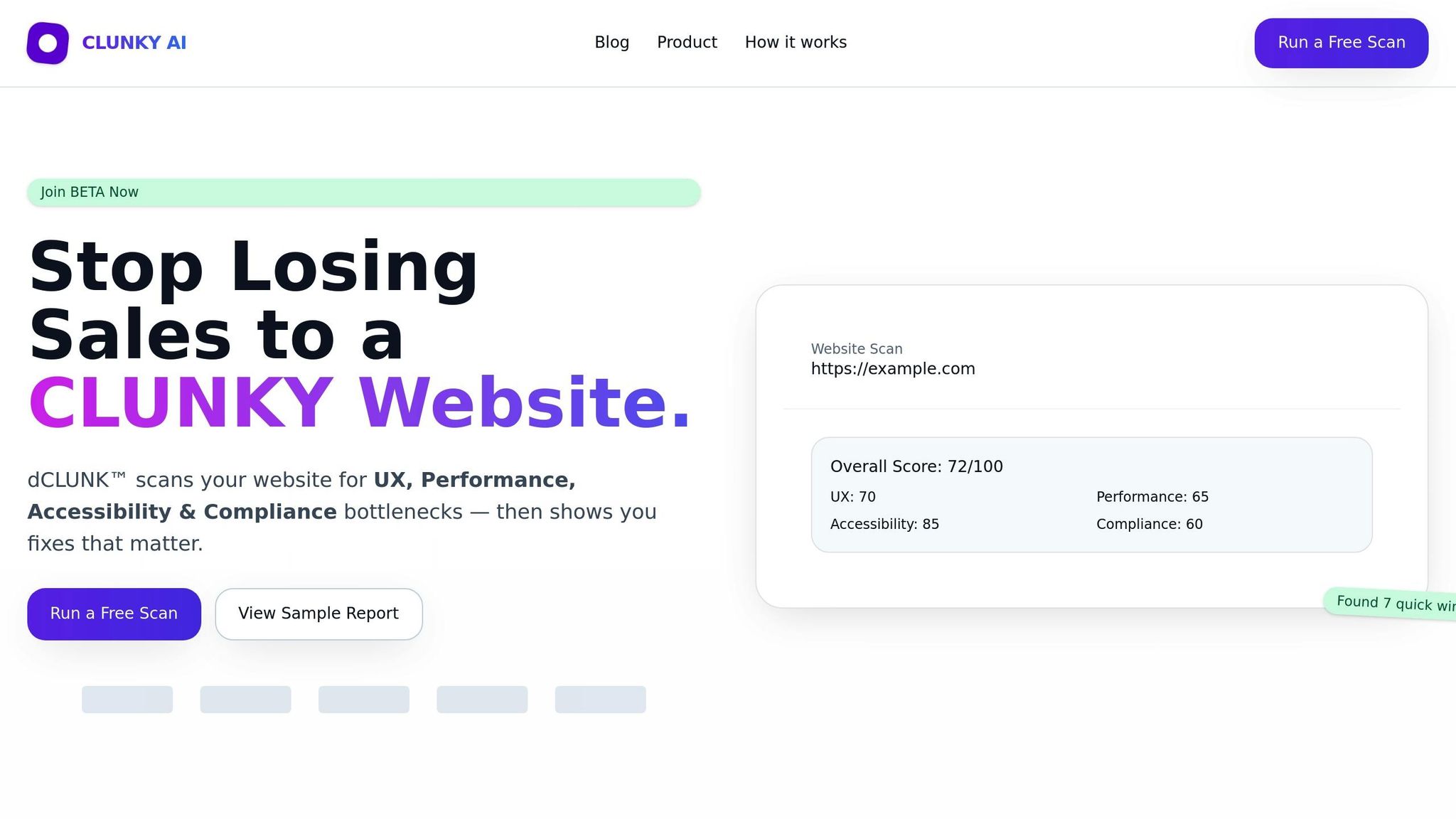
Tackling compliance issues like accessibility, privacy, and inclusivity can feel daunting, especially when done manually. That’s why automated scanning is such a game-changer. With CLUNKY.ai’s dCLUNK™ tool, you can analyze your website’s code in one comprehensive scan. It identifies accessibility failures, privacy risks, and inclusivity gaps, while also offering actionable solutions. This process not only protects your website from potential risks but also ensures a better experience for all users.
Automated Compliance Scanning
The dCLUNK™ tool dives into your website’s code to spot a range of issues. It checks for missing alt text, ensures color contrast ratios meet accessibility standards, reviews semantic markup, and identifies problems with keyboard navigation and form labels. For instance, it flags interactive elements that aren’t keyboard-accessible and form fields missing proper labels.
On the privacy side, it evaluates cookie consent mechanisms and checks for GDPR compliance signals. These scans are particularly valuable because they catch the same issues that plaintiffs’ lawyers often use automated tools to find. Achieving zero scan errors can significantly lower your legal risks, as these errors are frequently the basis for lawsuits.
Prioritized Fix Recommendations
Once the scan is complete, dCLUNK™ doesn’t just leave you with a list of problems - it helps you prioritize fixes. Not all compliance issues are equally urgent, so the tool ranks them based on severity, user impact, and legal risk. For example, high-priority fixes focus on common issues found in ADA lawsuits, like keyboard traps or missing form labels.
The recommendations are also organized by WCAG conformance levels (A, AA, and AAA), guiding you through basic requirements before tackling advanced ones. For example, missing alt text is flagged as critical because of its significant legal and usability impact. On the other hand, a minor color contrast issue on a footer link might be assigned a medium priority. This approach ensures you focus on what matters most, rather than wasting time on less critical tweaks. With 96% of websites failing basic accessibility tests and ADA lawsuit settlements exceeding $25 million in 2023, addressing these fixes strategically can help you avoid costly legal troubles.
Free Scanning for All Websites
Here’s a bonus: dCLUNK™ offers free scanning for small businesses and solo entrepreneurs. You can scan any website URL without signing up for a subscription, making it accessible even if you’re working with limited resources. This is crucial because small businesses are often targeted in accessibility lawsuits - federal class actions have even named e-commerce owners earning as little as $150,000 in annual revenue.
The free scan delivers actionable recommendations you can use right away, whether you’re fixing the issues yourself or forwarding the report to a developer. While automated scans can’t replace a full manual audit or user testing by individuals with disabilities, they’re a vital first step in reducing legal risks and improving the overall accessibility of your site.
How to Fix and Maintain Compliance
Once you've pinpointed compliance issues through scanning, the next step is tackling them effectively while ensuring long-term adherence to standards. Most problems can be resolved with straightforward updates to your code, content, and internal workflows.
Fixing Accessibility Problems
To address accessibility, follow the POUR principles: make your content Perceivable, Operable, Understandable, and Robust. Aim for Level AA conformance, as this removes major barriers for users with disabilities and aligns with the U.S. Department of Justice's upcoming requirements for state and local government websites by 2026.
Start by adding descriptive alt text for images that convey information, while decorative images should use an empty alt attribute (alt=""). Ensure your text and graphics meet WCAG color contrast standards to enhance readability.
Interactive elements like links, buttons, and forms must work seamlessly with a keyboard. Include a "Skip to Main Content" link at the top of every page for better navigation. If you replace the default focus outline, ensure your custom indicator meets a 3:1 contrast ratio.
Forms should have properly labeled input fields using <label> or aria-label attributes, and error messages should be clear and linked via aria-describedby. Use semantic HTML5 elements like <main>, <nav>, and <header> to organize content logically. Maintain a proper heading structure (H1–H6) and specify the lang attribute in the <html> tag (e.g., <html lang="en">).
Your site should remain fully functional at 200% zoom and on screens as narrow as 320 pixels. Interactive elements should be at least 24 × 24 pixels to support users with motor impairments.
Once accessibility is in place, shift your attention to improving privacy practices.
Improving Privacy Practices
Privacy compliance starts with clarity and user control. Use plain language in your privacy policies to explain what data you collect and why. Collect only the personal information that’s absolutely necessary for specific purposes you've communicated to users.
Deploy a Consent Management Platform (CMP) to track user consent in real time. Automated cookie scanners can help identify and categorize tracking technologies on your site, ensuring users can easily update, correct, or delete their data and withdraw consent.
Set clear data retention policies by deleting personal information when it’s no longer needed. Conduct Data Privacy Impact Assessments (DPIAs) for high-risk data processing or when introducing new technologies.
After implementing these changes, maintaining compliance requires ongoing monitoring and staff education.
Regular Monitoring and Staff Training
Compliance isn’t a one-and-done effort - it demands regular oversight. Run automated scans frequently, and supplement them with manual testing using keyboards and screen readers like JAWS, NVDA, or VoiceOver. Tools like the WAVE browser extension are particularly helpful for evaluating dynamic or non-public pages.
Before publishing new content or documents (like PDFs), verify they meet accessibility standards. Always provide an equivalent text-based format, such as HTML or RTF, for PDFs.
Training is essential - not just for developers but also for designers, content creators, and contractors who manage website content. Regular training sessions and privacy-focused onboarding can integrate data protection into the daily routines of marketing, HR, and IT teams, minimizing legal risks and building user trust. Appointing an ADA Coordinator and establishing a formal accessibility policy can further solidify your efforts.
Make sure users can easily report accessibility issues by providing clear contact information on your homepage. Involve individuals with diverse disabilities in testing your website and keep thorough documentation. Regular audits can demonstrate compliance with frameworks like GDPR or CCPA, ensuring you're always prepared.
Conclusion
Website compliance goes beyond meeting legal requirements - it's about safeguarding your business while making your site welcoming to a broader audience. Accessibility isn't a niche concern; it impacts 57% of computer users, enhancing their experience and making your site more inclusive.
The stakes are getting higher as automated tools make it easier to identify violations. With the Department of Justice adopting WCAG 2.1 Level AA as the standard and mandating compliance for state and local government websites by April 24, 2026, businesses face growing pressure to act. As Kris Rivenburgh, Founder of Accessible.org, aptly puts it:
"The longer your website remains inaccessible, the higher your lawsuit risk".
In this tightening legal environment, having practical tools is critical. Platforms like CLUNKY.ai make compliance manageable by offering free scans that identify common accessibility issues and rank them by risk. This approach removes the guesswork and helps save both time and money.
FAQs
How can I make sure my website complies with ADA standards?
Making your website ADA-compliant means ensuring it’s accessible to everyone, including individuals with disabilities. Here’s how you can get started:
- Use descriptive alt text for images: This helps screen readers convey image content to visually impaired users.
- Enable keyboard-friendly navigation: Ensure users can navigate your site without a mouse.
- Label form fields clearly: Proper labels make forms easier to understand and complete.
- Fix common issues: Address things like poor color contrast and missing captions on videos.
To stay on top of accessibility, regularly run accessibility audits using reliable tools. Even better, involve people with disabilities in testing to get real insights. Staying compliant isn’t a one-time task - it requires consistent monitoring of updates to standards and applying the latest best practices. Beyond avoiding legal troubles, this approach creates a better experience for all your users.
What are the most common accessibility issues that can result in lawsuits?
When it comes to accessibility-related lawsuits, some issues pop up more often than others. Two of the biggest offenders? Missing alternative text for images and poor color contrast. Without alt text, screen readers can't describe images to visually impaired users. And when text doesn't stand out against its background, it can be tough - or even impossible - for people with visual impairments to read.
Other frequent problems include:
- Lack of keyboard navigation: Some users rely entirely on keyboards to navigate websites, and when this option isn't available, it creates a major barrier.
- Inaccessible forms: Forms that aren't properly labeled or structured can be confusing or unusable for assistive technologies.
- Improper ARIA labels: Accessible Rich Internet Applications (ARIA) labels help screen readers interpret content. Without them - or when they're used incorrectly - users may struggle to understand or interact with your site.
These issues don't just make websites harder to use; they also violate ADA and WCAG standards, leaving companies open to lawsuits. Fixing these problems ahead of time isn't just about compliance - it's about creating a better, more inclusive experience for everyone.
How does the GDPR impact my website's privacy policies?
The General Data Protection Regulation (GDPR) sets strict rules for how websites manage personal data, emphasizing transparency and accountability. This includes providing clear explanations about how user data is collected, stored, and used. In many cases, websites must also obtain explicit consent from users before processing their data.
Another critical aspect is giving users control over their personal information. This means allowing them to access, update, or request the deletion of their data. Ignoring these requirements can result in hefty fines and harm your website's reputation. To stay compliant, prioritize strong privacy practices and implement effective safeguards.
Explore the six basics
Every Clunky AI article maps back to one or more of the questions a business site has to answer.
Related Posts
Tags AccessibilityResponsive DesignUser Experience
Category Website Compliance